Last updated: 27 October 2026
By Swapnil Patil, remote WordPress developer
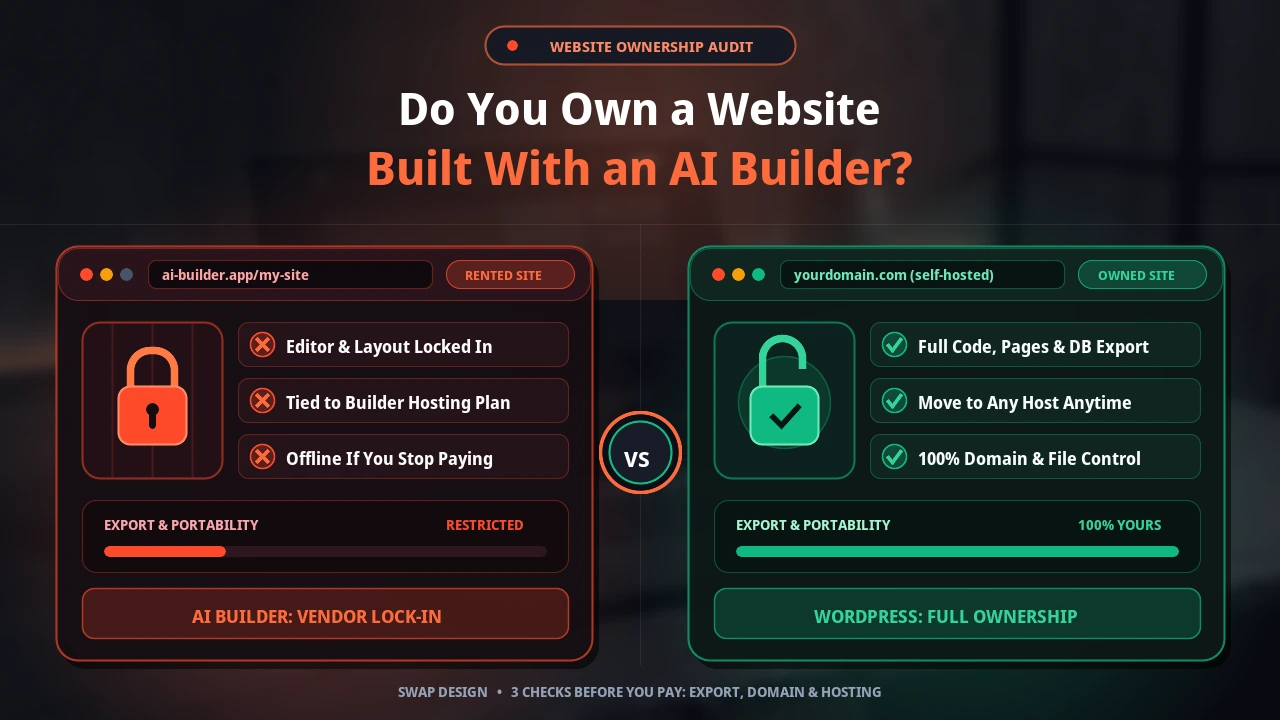
If you are asking yourself, do I own my AI website, the short answer is that it depends entirely on your builder’s terms of service. Before you pay for an annual plan or spend weekends adding pages, check three things in the platform’s terms: can you export your pages as clean files, can you move your domain name to another registrar whenever you want, and who controls the underlying web hosting. Checking those three points upfront tells you whether you own a portable business asset or are renting space on a closed platform.
What Does “Owning a Website” Actually Mean?
When business owners talk about AI website builder ownership, the word “own” covers five separate pieces of your online presence. A builder might give you full rights to one piece while keeping total control over the other four:
- Your written content and photos: The text you write, your company logo, and the product or team photos you upload almost always remain yours, though you should still read your builder’s terms to see what licence you grant them while your site is hosted there.
- Your visual design and page layout: The way sections, fonts, and grids are arranged on screen is often tied to the platform’s proprietary layout engine.
- The underlying code and database: The HTML, CSS, scripts, and database records that make the site work in a browser.
- Your domain name: The web address (`yourbusiness.com`) that customers type into Google or click on your business card.
- Your web hosting account: The server that stores your site files and keeps your pages online twenty-four hours a day.
What Are the Three Checks to Make Before You Pay?
Because every platform writes its own contract, never assume two AI tools work the same way. Read your builder’s terms of service and help docs for these three checks before entering your card details:
- Check the export policy: Search the platform’s documentation for AI website builder export. Look for whether you can download full HTML, CSS, media folders, and blog posts, or if export is blocked on your pricing tier.
- Check domain transfer rules: If the builder offers a “free domain for the first year,” check whose name is listed as the legal registrant and whether there is a lock period or transfer fee if you leave later.
- Check whether hosting is bundled or separate: Find out if the site can run on any standard web host or if it only functions while you pay a monthly subscription to that specific builder.
What Does an AI Website Builder Export Usually Give You?
Even when a platform advertises an AI website builder export feature, what lands in your downloaded zip file varies widely. Some builders generate clean static HTML and CSS or export directly into WordPress themes and blocks, which makes moving straightforward.
On many closed platforms, however, exporting either is not offered at all or only gives you raw text and images in a spreadsheet or basic HTML file. What you usually do not get is the visual drag-and-drop editor, the responsive layout system, the working contact forms, the booking calendar, or the checkout database. If you decide to move site off an AI builder that locks its code, a developer has to rebuild your page layouts and forms from scratch on your new platform.
Where Is Your Domain Registered and What Happens If You Stop Paying?
Your domain name is the single most important part of do I own my AI website. If you register your domain through an independent registrar (like Cloudflare, Namecheap, or Porkbun) and simply point it to your website builder, you stay in charge. You can point that domain to a new host at any time.
If you stop paying for a hosted AI builder subscription, your live pages, forms, and layout usually go offline as soon as the billing cycle ends. Unless you exported your text and images before cancelling, you can lose access to the dashboard and everything built inside it. Always read your builder’s cancellation terms so you know how many days they keep backups after an account closes.
When Is an AI Builder Fine, and When Is WordPress the Better Choice?
To be fair, an AI builder is a reasonable choice in several situations. Some builders do allow full code export, and some projects never need to leave their first platform. If you are testing a short-lived event page, validating a new business idea for three months, or putting up a temporary brochure with no plans to expand, an AI builder gets you online quickly.
Self-hosted WordPress is the better choice when you want to keep your business website for years, move between web hosts whenever you choose, add custom booking or quoting features later, and own every file and database table outright. When I build a custom WordPress website from $500 or a single landing page for $200, the entire site is built on your own hosting account and domain name, so you never have to ask permission to move or edit your own business asset.
| Feature | Hosted AI Website Builder | Self-Hosted WordPress |
|---|---|---|
| Code and file export | Depends on builder terms; often locked | Full access to all files and database |
| Hosting choice | Tied to the builder platform | Move to any web host anytime |
| If you stop paying the builder | Website goes offline | Site stays yours on your chosen host |
| Adding custom features later | Limited to built-in platform tools | Open plugin ecosystem and custom code |
| Best suited for | Short tests and temporary pages | Long-term small business websites |
If you already have a site on a closed platform and want to check what can be saved before moving to WordPress, send me your website link and I will tell you plainly what transfers over and what needs rebuilding.