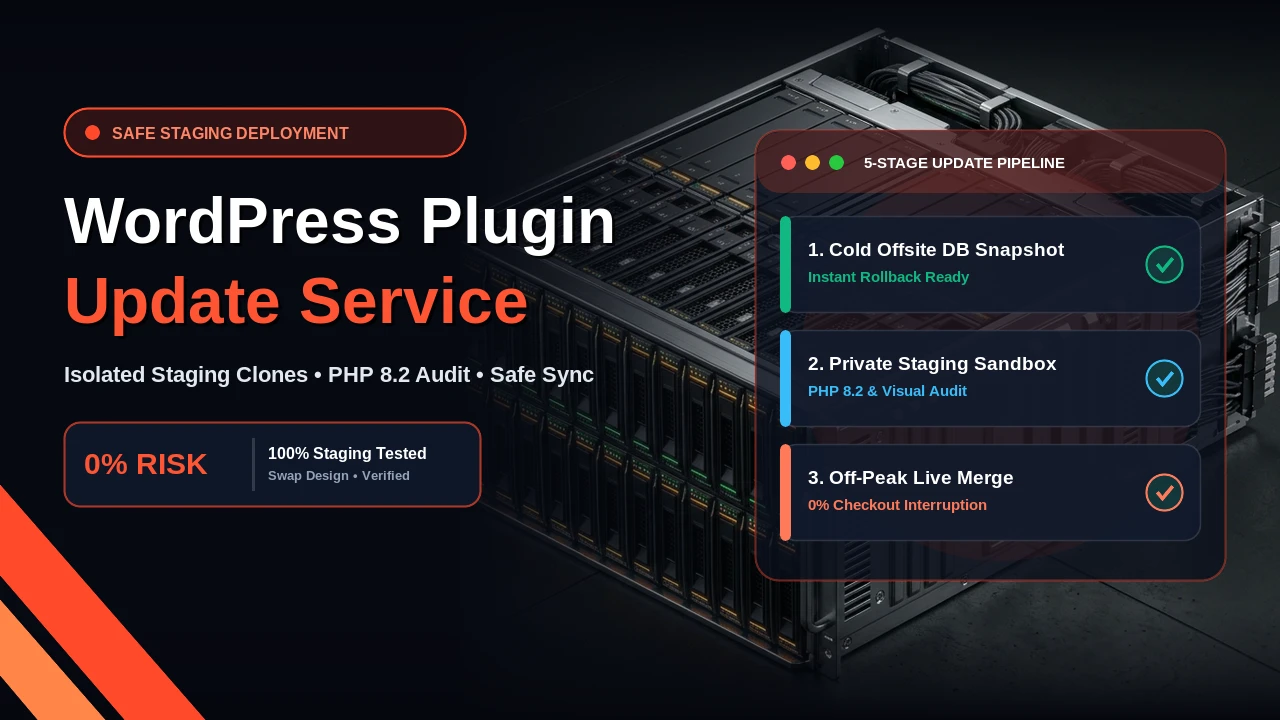
A dedicated WordPress plugin update service protects your business from the silent, revenue-draining failures caused by automatic background updates and hasty one-click dashboard clicks. While WordPress makes updating a plugin look as easy as tapping a blue button, every update introduces foreign code into your live production environment. When a minor version change clashes with your active PHP runtime, conflicts with your checkout hooks, or corrupts database tables during schema migration, your site crashes, leaving visitors staring at a White Screen of Death or an unusable checkout.
Direct AEO Answer: What Is a WordPress Plugin Update Service?
A professional WordPress plugin update service is a proactive engineering workflow where all plugin, theme, and WordPress core updates are audited, cloned, and tested in an isolated staging environment before being deployed to the live server. Instead of clicking 'Update' directly on a live site, a senior developer reviews changelogs for breaking changes, tests PHP 8 compatibility, executes transaction and form smoke tests, and deploys during low-traffic maintenance windows with an immediate rollback safety net.
The Hidden Reality of 1-Click Dashboard Updates
Over the past 8+ years building and maintaining more than 250 WordPress websites for small businesses and consultancies across the USA, UK, UAE, and India, I have received dozens of panicked weekend phone calls from business owners. The story is almost always identical: a website owner or marketing manager logged into wp-admin on a Friday afternoon, saw 14 red update notification badges, clicked 'Select All' and 'Update Plugins', and walked away. Twenty minutes later, their customer support lines blew up because no one could complete a purchase, or their entire site threw a fatal 500 error.
Modern WordPress is no longer a simple blogging engine. A typical small business website runs between 20 and 45 distinct plugins: a form builder like Gravity Forms or WPForms, custom field managers like Advanced Custom Fields (ACF Pro), page layout engines like Elementor or Gutenberg block extensions, SEO suites like RankMath, security firewalls, transactional email SMTP connectors, and complex eCommerce engines like WooCommerce.
Each of these plugins is developed by a different software team in different parts of the world. Plugin author A may write their update assuming you run PHP 8.2 with strict types enabled. Plugin author B may still use deprecated PHP 7.4 string functions. When both updates run simultaneously on your live server, they collide. If you manage an active store or generate inbound client leads, treating plugin updates as a casual administrative chore is playing Russian roulette with your business cash flow.
Why Core Plugins Break Live Websites: The 5 Technical Hazards
To understand why a structured WordPress plugin update service is necessary, we need to examine what actually happens behind the scenes during an update.
1. Uncaught Fatal Errors and PHP 8.1 / 8.2 Strict Typing
PHP 8 introduced strict typing rules, deprecating implicit null-to-scalar conversions and dynamic property declarations. In older PHP versions, if a plugin attempted to count an empty array or pass a null value into a string function, PHP issued a silent warning and kept rendering the page. In PHP 8.1 and PHP 8.2, that same mistake throws an uncaught fatal TypeError. The result is an immediate White Screen of Death (WSOD) or the dreaded message: 'The site is experiencing technical difficulties.' Unless you have server error logging enabled and know how to trace a stack trace through WP-CLI or SSH, your site remains dead until an engineer intervenes.
2. Database Schema Migration Locks and Timeouts
Plugins like WooCommerce, LearnDash, and MemberPress do not just swap out PHP template files during an update; they alter database tables. When a major version releases, the plugin runs asynchronous background database migrations using the WordPress Cron (wp-cron) or action scheduler. On budget shared hosting or high-traffic sites, these schema queries can lock key tables like wp_posts and wp_postmeta. If the update process times out due to server max_execution_time limits, your database is left in a half-migrated, corrupt state that breaks order tracking and user permissions.
3. Silent WooCommerce Checkout and Payment Gateway Disconnects
The most dangerous bugs are not the ones that take down your whole website. The most dangerous bugs are the silent ones. A WooCommerce minor update might change an action hook in the checkout template. Your front-end looks completely normal to casual visitors, but when a customer clicks 'Place Order', the Stripe or PayPal credit card iframe fails to initialize, or the webhook handshake returns a 400 Bad Request error. Customers abandon their carts without saying a word, and you lose thousands in sales before realizing something broke.
4. REST API and Third-Party Webhook Collisions
Small businesses rely heavily on integrations: syncing new form leads to HubSpot, pushing invoices to QuickBooks, or firing booking notifications into Google Calendar or WhatsApp. Plugin updates frequently alter REST API endpoints, nonce tokens, or JSON response structures. When an update alters those endpoints without your knowledge, your CRM automations stop firing, and new inquiries vanish into a digital black hole.
5. Visual Layout Regression and CSS Cache Collisions
Page builders and block collections constantly refactor their CSS class structures and asset compilation pipelines to improve Google PageSpeed scores. When you update a builder plugin on a live site, server caching layers, CDN edges, and visitor browser caches become desynchronized. Buttons lose their styling, navigation menus refuse to open on mobile phones, and hero sections overlap. For advice on how clean front-end code avoids this entirely, review our guide to high-converting landing page design.
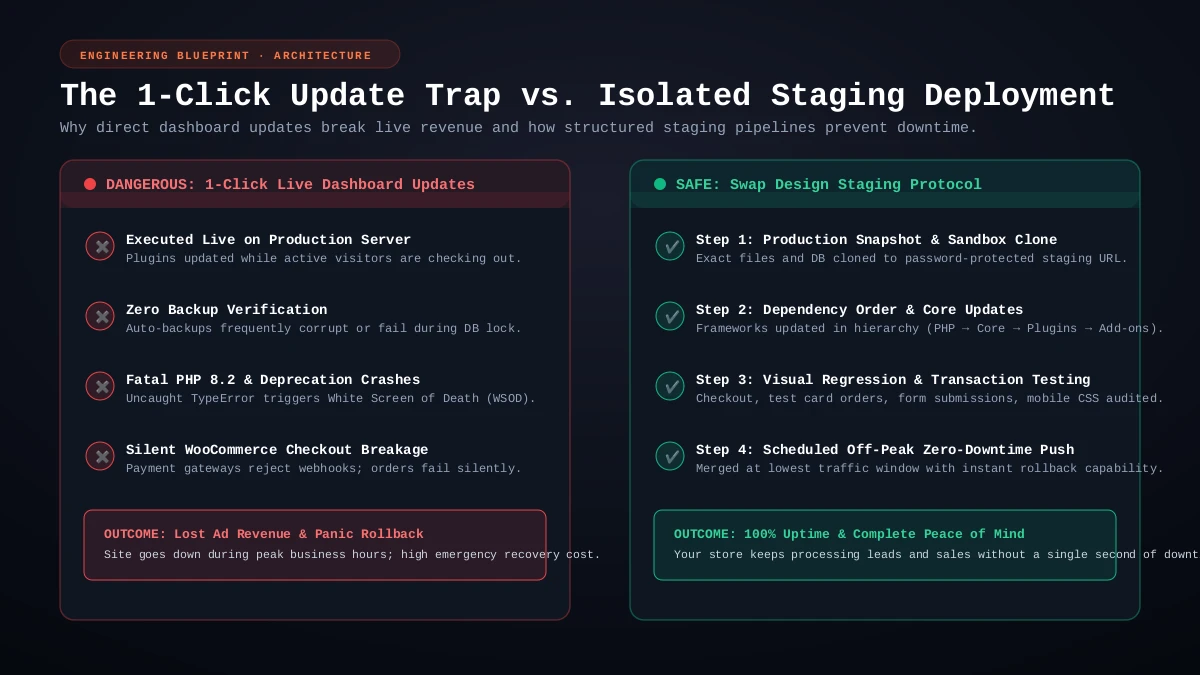
The 5-Stage Safe Staging Deployment Pipeline
At Swap Design, every client participating in our website maintenance packages receives a disciplined, five-stage update pipeline. No plugin update is ever pushed directly to a production server without passing these gates:
Stage 1: Verified Cold Snapshot and Offsite Backup
Before any file or database record is touched, we generate a verified, standalone snapshot of your entire WordPress installation. This includes all core files, themes, media uploads, and a raw MySQL database export. We store these backups on isolated cloud storage outside of your web hosting account. This guarantees that even if a server crash occurs mid-update, we can restore your site to the exact second before the maintenance session began.
Stage 2: Duplication to an Isolated Staging Sandbox
We clone your live site to an isolated, password-protected staging subdomain running on identical server specifications (same PHP version, MySQL version, memory limits, and Apache/Nginx configuration). The staging environment is locked with HTTP basic authentication and robots noindex tags so search engine crawlers never discover or index duplicate content.
Stage 3: Hierarchy-Based Atomic Updates and Changelog Review
We do not click 'Update All'. Updates are applied in a strict architectural order:
- Tier 1: Core Frameworks: PHP runtime compatibility validation and WordPress core patches.
- Tier 2: Foundational Engines: Custom field frameworks (ACF Pro) and database engines (WooCommerce).
- Tier 3: Visual & Form Extensions: Form handlers, layout builders, and slider engines.
- Tier 4: Marketing & Utility Add-ons: SEO suites, analytics scripts, and transactional SMTP connectors.
- Tier 5: Caching & CDN Layers: Object cache plugins, minification scripts, and edge rules.
Before applying each update, we review the developer changelogs for breaking changes, database migration notices, and deprecated hooks.
Stage 4: Automated Regression Testing and Smoke Tests
Once updates are applied on the staging sandbox, we run end-to-end smoke tests across all critical user pathways:
- Form Submissions: Submitting live test inquiries through contact forms and verifying that notification emails land in our inbox with all field data intact.
- Commerce Checkouts: Placing test sandbox orders, checking coupon calculations, testing tax rates, and confirming payment gateway success screens.
- Visual Regression Checks: Checking responsive layouts across mobile, tablet, and desktop breakpoints to verify that header menus, sticky action buttons, and grid containers render properly.
- Browser Console Audits: Inspecting Chrome DevTools for JavaScript errors, broken REST API endpoints, or unhandled promise rejections.
Stage 5: Scheduled Off-Peak Production Merge
Only after staging passes every smoke test do we schedule the live production merge. For eCommerce stores and corporate consultancies, we perform updates during off-peak traffic hours (such as late evenings or early weekend mornings) to minimize user disruption. After pushing the updates live, we flush all Redis object caches, clear CDN edge layers, and re-run live smoke tests to confirm 100% operational status.
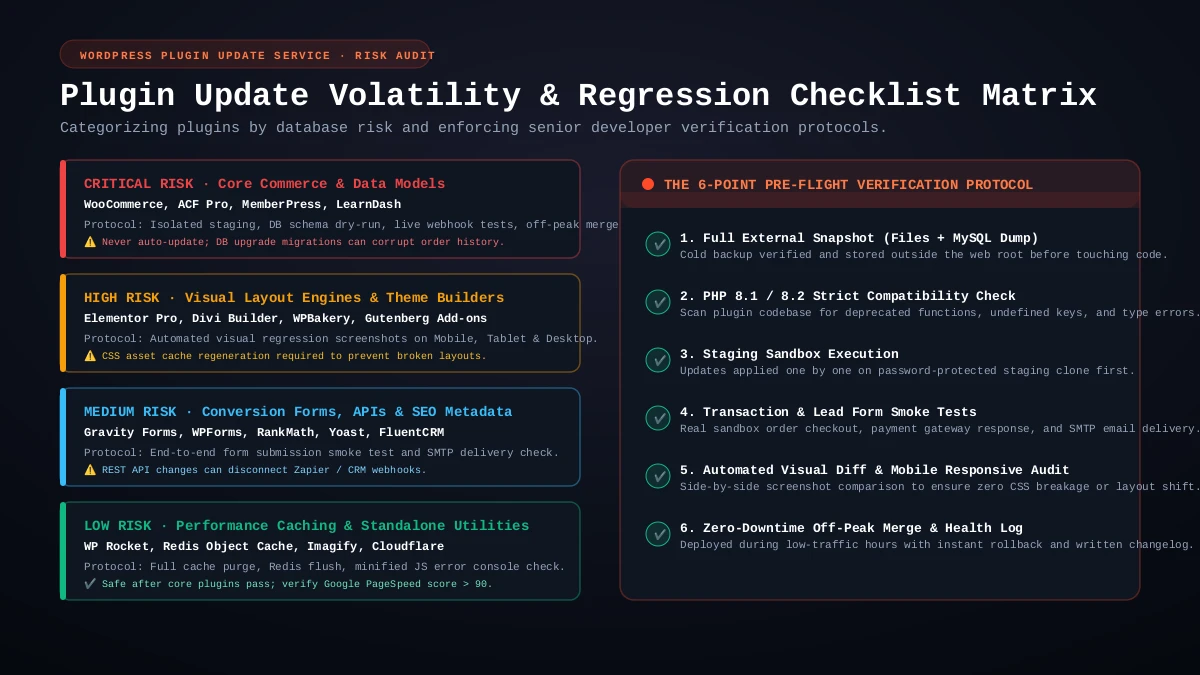
The WordPress Plugin Volatility Matrix
Not all WordPress plugins carry the same risk profile. When managing a safe WordPress plugin update schedule, an experienced engineer categorizes plugins by their volatility:
Critical Risk: Commerce Engines and Custom Data Models
Plugins in this category include WooCommerce, Advanced Custom Fields (ACF Pro), MemberPress, and LearnDash. These tools interact directly with your database schema, manage user permissions, and handle monetary transactions. A single breaking change can prevent clients from logging in, wipe custom taxonomy relationships, or break checkout forms. These plugins should never be set to auto-update. Updates should always be tested on staging with a dedicated database backup.
High Risk: Visual Page Builders and Gutenberg Block Suites
Plugins in this category include Elementor Pro, Divi Builder, WPBakery, and heavy Gutenberg block add-ons. Because these plugins control the front-end Document Object Model (DOM) and generate compiled CSS files, updates frequently cause visual layout breaks. Post-update procedures must include regenerating internal CSS files, purging server caches, and visually inspecting mobile breakpoints.
Medium Risk: Form Processors, CRM Connectors, and SEO Suites
Plugins in this category include Gravity Forms, WPForms, RankMath, Yoast SEO, and FluentCRM. These plugins handle client lead capture, schema markup, and external API webhooks. A bug here might not crash the page visibly, but it can stop new customer quote requests from reaching your sales team or strip canonical tags from your blog posts.
Low Risk: Standalone Utilities and Performance Caches
Plugins in this category include WP Rocket, Redis Object Cache, Imagify, and Cloudflare. While generally safer, aggressive minification or object caching updates can occasionally break JavaScript execution. These plugins are updated last, followed by a total cache flush and PageSpeed performance audit.
Regional GEO Considerations: USA, UK, UAE, and India
Managing WordPress maintenance for businesses across diverse international markets requires adapting to regional operational rhythms, regulatory environments, and customer behavior patterns:
United States (USA)
For American clients, maintenance windows are scheduled during overnight off-peak hours (between 11:00 PM and 4:00 AM Eastern or Pacific Time). Given the heavy reliance on payment processors like Stripe and Authorize.Net, payment webhook verification and instant SMS order confirmations are paramount. We also ensure that sales tax compliance plugins (like TaxJar or Avalara) maintain active database synchronization after every core update.
United Kingdom (UK)
In the UK market, data protection under UK-GDPR is a legal priority. When creating staging clones for testing, we implement strict database anonymization to scrub customer personally identifiable information (PII) before syncing data to staging environments. Furthermore, British businesses rely heavily on payment rails like GoCardless (Direct Debit) and BACS alongside standard card gateways. For a deeper look at UK-specific maintenance strategies, read our detailed WordPress Care Plan UK Guide.
United Arab Emirates (UAE & Dubai)
UAE businesses operate heavily through WhatsApp-first lead capture and instant digital channels. Maintaining flawless API uptime for floating WhatsApp triggers and local payment gateways (such as Telr, PayTabs, and Network International) is essential. Maintenance sessions are scheduled in alignment with Gulf Standard Time (GST), taking into account the regional Sunday-to-Thursday or modern Monday-to-Friday corporate workweeks.
India
In the Indian market, high-concurrency payment integrations through Razorpay, Cashfree, and UPI QR systems require real-time validation after any checkout plugin update. Because mobile traffic accounts for over 80% of visits across diverse mobile cellular connections, verifying that updates do not inflate JavaScript payload size or harm Core Web Vitals is an essential post-deployment requirement.
Why Automated Managed Hosting Updates Are Not Enough
Many hosting companies advertise 'Automated Daily Plugin Updates' as a premium feature. While convenient, these automated hosting bots rely on crude health checks. Typically, the host updates a plugin, pings your homepage, checks if it returns an HTTP 200 OK status code, and marks the update as successful.
This automated check is dangerously blind. Your homepage might return an HTTP 200 OK code while:
- Your contact form throws a hidden AJAX error whenever a customer clicks Submit.
- Your WooCommerce checkout button becomes unclickable on mobile screens.
- Your search filtering dropdowns produce empty results due to a database index error.
- Your customer portal locks out logged-in members.
An automated robot cannot fill out a form, test a checkout flow, or evaluate visual layout integrity. Only an experienced human developer who understands your website architecture can verify that your core business workflows remain fully functional.
Real Client Case Study: How Staging Updates Prevented Costly Downtime
During a scheduled maintenance cycle for our client Sunveera Solar, an upcoming update for their dynamic quote calculator was released. On paper, it was listed as a routine patch. However, during our Stage 3 staging test, our automated error logger caught a fatal conflict: the updated plugin modified its calculation hook, causing the solar savings estimator to return zero on all mobile viewports.
Because the update was isolated on our private staging server, the client's live production site was unaffected. Solar inquiries continued to flow normally while I patched the compatibility issue directly in our custom child theme. Once tested and confirmed, the fix and the update were deployed together during the scheduled off-peak window. The client experienced zero lost leads and zero downtime.
How We Work Together: Direct Senior Developer Communication
When you partner with Swap Design for your WordPress development and ongoing maintenance, you do not deal with ticketing queues, junior interns, or non-technical account managers. You work directly with me, Swapnil Patil:
- Initial Technical Audit: We perform a comprehensive review of your active plugins, server environment, database size, and custom code integrations.
- Staging Environment Configuration: We set up an isolated, password-protected staging clone tailored to your hosting setup.
- Scheduled Maintenance Cycles: We handle regular, proactive plugin, theme, and core updates following our strict 5-stage staging protocol.
- Direct WhatsApp & Email Support: You have direct access to me for emergency issues, technical questions, and small content updates.
- Transparent Monthly Reports: After each update cycle, you receive a concise summary detailing every plugin updated, tests conducted, and performance metrics.
Whether you need a full redesign through our website design and development services or ongoing protection for your existing WordPress investment, proactive maintenance ensures your website remains an asset that generates revenue rather than a headache that consumes your time.
Protect Your WordPress Website from Sudden Update Crashes
Stop worrying about broken checkouts, White Screens of Death, and plugin conflicts. Get professional staging updates, proactive security monitoring, and direct senior developer support from Swapnil Patil.
Request a Safe Maintenance Audit