Last updated: 18 November 2026
By Swapnil Patil, remote WordPress developer & Technical GEO architect
Small business founders in the USA, UK, UAE, and India keep asking me the exact same question: "My site ranks on page one of Google for our core services, so why does ChatGPT recommend two competitors and leave my company out?" Over the past 8+ years of building and auditing more than 250 WordPress and custom PHP sites, I kept running server-log inspections until the pattern became clear. Understanding why chatgpt skips business websites has nothing to do with keyword density or extra blog word count. ChatGPT, Perplexity, and Google AI Overviews run lightweight HTTP fetchers with short timeout limits. When those bots hit a slow page-builder shell and cannot find structured endpoints like /llms.txt or /.well-known/mcp/server-card.json, they move on to the next domain. Before reading further, you can run your own URL through our free 2026 AI-Agent Readiness Scanner to see your live score out of 10 in five seconds.
Direct Answer: Why AI Engines Skip Business Websites
Why ChatGPT skips business websites comes down to five missing technical signals: no /.well-known/mcp/server-card.json endpoint, a 404 on /llms.txt, heavy HTML returned instead of Accept: text/markdown, blocked or unconfigured AI crawlers in /robots.txt, and incomplete JSON-LD Offer schema. Fixing all five takes 48 hours on self-hosted WordPress or PHP.
Why Ranking on Google No Longer Guarantees AI Citations
Traditional Googlebot runs a full headless Chromium rendering pass over days or weeks. If a WordPress agency stacked 35 plugins and 1.8 MB of Elementor DOM wrappers onto your homepage, Google still waits long enough to index the text eventually.
Real-time AI retrieval bots operate on strict speed and token budgets. According to OpenAI's official crawler documentation, user-triggered bots like ChatGPT-User and indexers like OAI-SearchBot fetch live pages on demand when a buyer asks for vendor recommendations. Similarly, Google's AI Features documentation notes that AI Overviews pull concise, verifiable facts directly from cleanly structured page sections and schema graphs.
If an AI fetcher receives megabytes of navigation menus, cookie scripts, and pricing hidden inside tabs or PDFs, it burns token budget parsing layout HTML instead of your actual offer. Even when the page loads, missing pricing currencies, vague agency buzzwords, and zero machine-readable endpoints push your business below competitors that expose exact facts cleanly.
Traditional Google SEO vs. 2026 AI-Agent Readiness
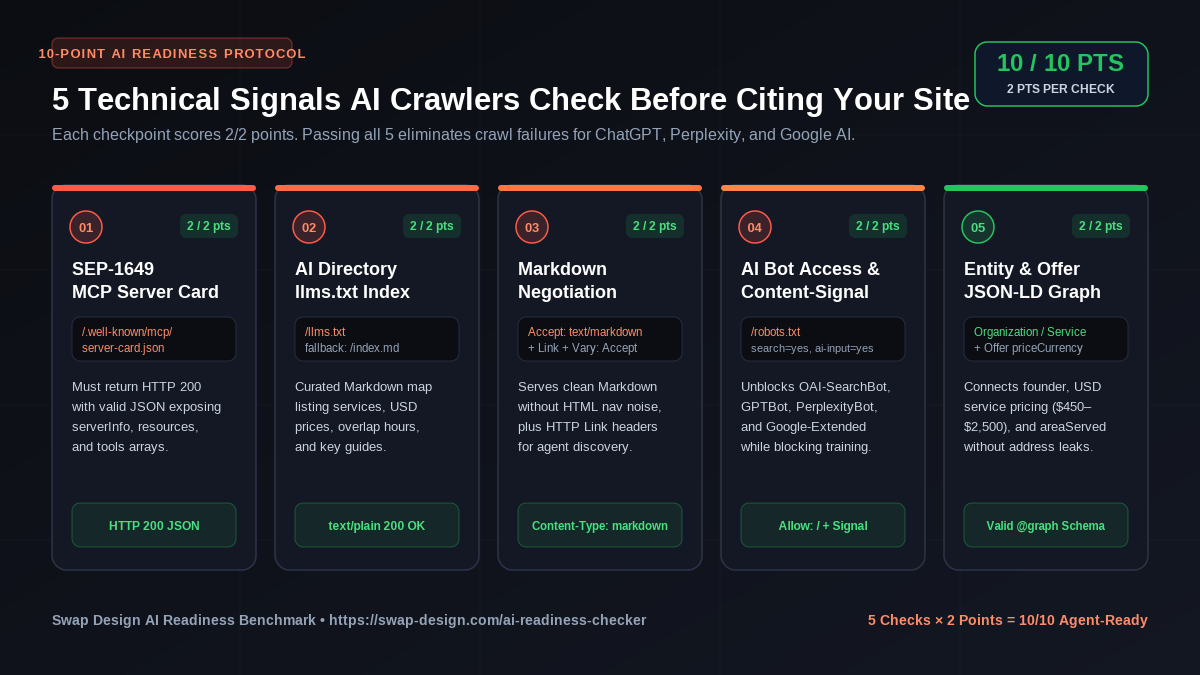
Small business owners often hear that good SEO automatically covers AI search. Standard on-page SEO covers only two of the signals modern AI answer engines inspect. The table below breaks down how Google Search crawlers differ from 2026 AI agents.
| Technical Layer | Traditional Google SEO (2020–2024) | 2026 AI-Agent Readiness (GEO / AIO) |
|---|---|---|
| Site Directory File | /sitemap.xml lists page URLs only. |
/llms.txt and /index.md summarize services, USD pricing, and canonical links for LLMs. |
| Capability Discovery | HTML footer links and contact forms. | /.well-known/mcp/server-card.json (SEP-1649) returns HTTP 200 JSON with serverInfo and tools. |
| Response Format | Full HTML payload (often 1.2 MB–3.0 MB with builder CSS/JS). | Clean text/markdown (~4 KB) served when request includes Accept: text/markdown plus HTTP Link headers. |
| Crawler Policy | Generic User-agent: * and Allow: /. |
Explicit rules for OAI-SearchBot, GPTBot, PerplexityBot, Google-Extended, and Content-Signal directives. |
| Structured Pricing Data | Standalone WebPage or minimal Organization tag. |
Connected @graph JSON-LD linking Organization, Service, areaServed, and explicit USD Offer ranges. |
Why ChatGPT Skips Business Websites: The 5 Technical Failure Points
When a website looks invisible to AI search, the problem usually hides in server responses rather than copywriting. Below are the exact five failure points we test across every audit, paired with copy-paste code fixes you can deploy on Apache, LiteSpeed, or self-hosted WordPress.
1. Missing SEP-1649 MCP Server Card (/.well-known/mcp/server-card.json)
Autonomous agents and ChatGPT Connectors inspect /.well-known/mcp/server-card.json to discover structured endpoints before parsing random HTML pages. On 95% of small business websites, requesting this path returns an HTTP 404 Not Found HTML error page.
Publish a lightweight static JSON file at /.well-known/mcp/server-card.json and ensure your server sends Content-Type: application/json with HTTP 200. Include serverInfo, your official resource URLs, and tool schemas:
{
  "$schema": "https://modelcontextprotocol.io/schemas/mcp-server-card/v1.json",
  "protocolVersion": "2025-03-26",
  "serverInfo": {
    "name": "Your Business MCP Server",
    "version": "1.0.0",
    "homepage": "https://yourdomain.com/"
  },
  "resources": [
    {
      "uri": "https://yourdomain.com/llms.txt",
      "name": "Business Context Directory",
      "mimeType": "text/plain"
    }
  ],
  "tools": [
    {
      "name": "get_services",
      "description": "Return core service tiers, USD pricing, and turnaround times.",
      "inputSchema": { "type": "object", "properties": {} }
    }
  ]
}
Getting a 403 Forbidden or WordPress 404 Not Found even after uploading the JSON file? Follow our dedicated WordPress & LiteSpeed .htaccess guide for fixing /.well-known/mcp/server-card.json errors with exact permissions and curl verification steps.
2. No /llms.txt Directory (Or a WordPress Soft-404 HTML Page)
The llms.txt specification gives AI models a clean Markdown cheat sheet right at your root domain. Instead of forcing PerplexityBot to crawl 25 archive pages just to guess what you charge, /llms.txt presents verified facts in under 5 KB.
One common bug happens when site owners link to /llms.txt without disabling WordPress fallback routing. If the file does not exist or gets intercepted, WordPress returns an HTML 404 page with Content-Type: text/html, failing automated checks immediately. Upload a real UTF-8 text file to your root folder returning HTTP 200 and text/plain containing your brand summary, exact service prices, turnaround windows, timezone overlap, and canonical guide URLs.
3. Returning 1.8 MB HTML on Accept: text/markdown Requests
When an AI agent sends the HTTP request header Accept: text/markdown, most servers ignore it completely and dump full theme HTML packed with sliders, icon fonts, and tracking tags. Passing this checkpoint earns 2 full points because it cuts crawler token cost by 90% and eliminates HTML parsing errors.
You can implement Markdown content negotiation in Apache or PHP by inspecting $_SERVER['HTTP_ACCEPT'] at the top of your bootstrap file and serving a clean Markdown payload alongside an HTTP Link discovery header and Vary: Accept:
<?php
header('Link: <https://yourdomain.com/llms.txt>; rel="llms-txt"; type="text/plain", <https://yourdomain.com/.well-known/mcp/server-card.json>; rel="mcp-server-card"; type="application/json"', true);
header('Vary: Accept', true);

$accept = strtolower($_SERVER['HTTP_ACCEPT'] ?? '');
if (strpos($accept, 'text/markdown') !== false) {
    http_response_code(200);
    header('Content-Type: text/markdown; charset=utf-8', true);
    readfile(__DIR__ . '/index.md');
    exit;
}
If you want full copy-paste templates covering HTTP Link headers, WordPress hooks, and navigator.modelContext WebMCP registration, follow my step-by-step AI-Agent Readiness & Technical GEO Implementation Guide.
4. Blocked AI Crawlers or Missing Content-Signal Rules in /robots.txt
Many security plugins and Cloudflare "Block AI Scrapers" toggles block OAI-SearchBot and PerplexityBot by default. While blocking bulk model-training crawlers makes sense for private publishing sites, blocking search retrieval bots removes your business from live answers entirely.
Instead of a blanket block, declare explicit access for search fetchers and separate training preference via Content-Signal in /robots.txt:
User-agent: *
User-agent: Googlebot
User-agent: Google-Extended
User-agent: OAI-SearchBot
User-agent: ChatGPT-User
User-agent: GPTBot
User-agent: PerplexityBot
User-agent: ClaudeBot
Content-Signal: search=yes, ai-input=yes, ai-train=no
Allow: /
Disallow: /wp-admin/

Sitemap: https://yourdomain.com/sitemap.xml
If Rank Math throws 1 unknown rules found when you try saving Content-Signal inside wp-admin, follow our dedicated guide to fixing robots.txt Content-Signal and GPTBot rules in WordPress using either a physical root file or a WPCode PHP filter.
5. Disconnected JSON-LD Schema Without Service Offer Pricing
Generic SEO plugins emit an isolated WebPage block that confirms your business name and logo, then stops. When a US buyer asks Perplexity "How much does a 5-page WordPress website cost from a reliable developer?", the model favors businesses whose JSON-LD connects the Organization, Service, areaServed, and explicit Offer pricing nodes.
On remote service-area businesses, skip street home addresses and declare clean areaServed countries (USA, UK, UAE, India) plus exact USD package prices. That single change turns vague "Contact for quote" copy into verified, citable facts.
Case Study Audit: Typical 4/10 Elementor Build vs. Swap Design 10/10 Benchmark
To show how this looks in real production diagnostics, I compared a typical client-facing WordPress + Elementor agency site against swap-design.com inside our live AI-Agent Readiness Checker.
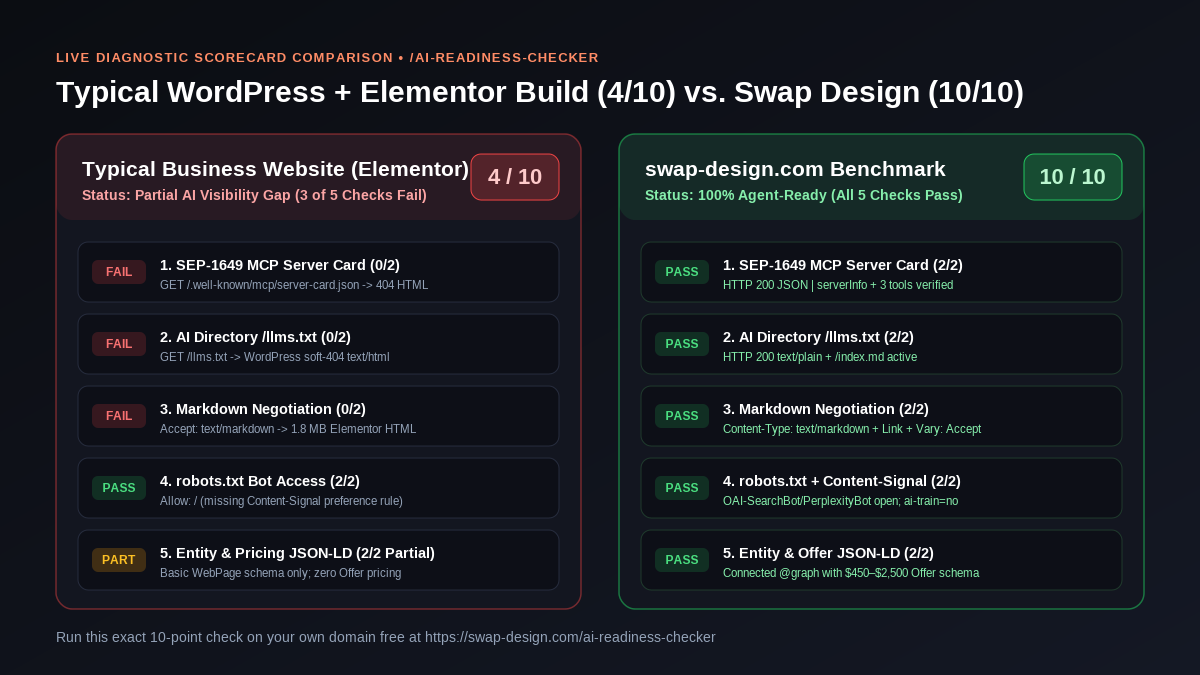
Here is what broke on the 4/10 Elementor site versus the custom PHP and lightweight Gutenberg stack on Swap Design:
- Payload Size on Crawl: The Elementor site forced bots to download 1.8 MB of uncompressed DOM HTML, widget stylesheets, and slider scripts. On
swap-design.com, sendingAccept: text/markdownreturns a clean 5 KB Markdown brief in under 90 ms. - Discovery Endpoints: Both
/.well-known/mcp/server-card.jsonand/llms.txtreturned WordPress soft-404 HTML pages on the Elementor site (0/4 points). Swap Design returns verified HTTP 200 JSON andtext/plainresponses (4/4 points). - Commercial Clarity: Even when an AI bot managed to read the Elementor homepage, zero pricing appeared anywhere in HTML or JSON-LD. Combined with weak hero positioning, the same speed and layout issues are often the reason a website gets traffic but generates zero leads from real human buyers too.
If your team works with a remote WordPress developer for small businesses in the USA, fixing these five layers before or alongside a redesign turns every service page into a direct citation asset across Google, ChatGPT, and Perplexity.
What Happens When Your Site Hits 10/10? (A Real Client Case Study)
Theory sounds nice, so let us look at production numbers on an active publication we built and tuned: techhubinsight.com (read the full TechHub Insight case study). Before we configured the five AI-agent endpoints, the WordPress site scored 4/10 on live scans. It returned HTML pages to bots asking for Markdown and lacked a SEP-1649 MCP Server Card or /llms.txt directory.
After deploying all five fixes, techhubinsight.com jumped from 4/10 to a verified 10/10 Agent-Ready benchmark, passing 5 out of 5 checks in 1,533 ms:
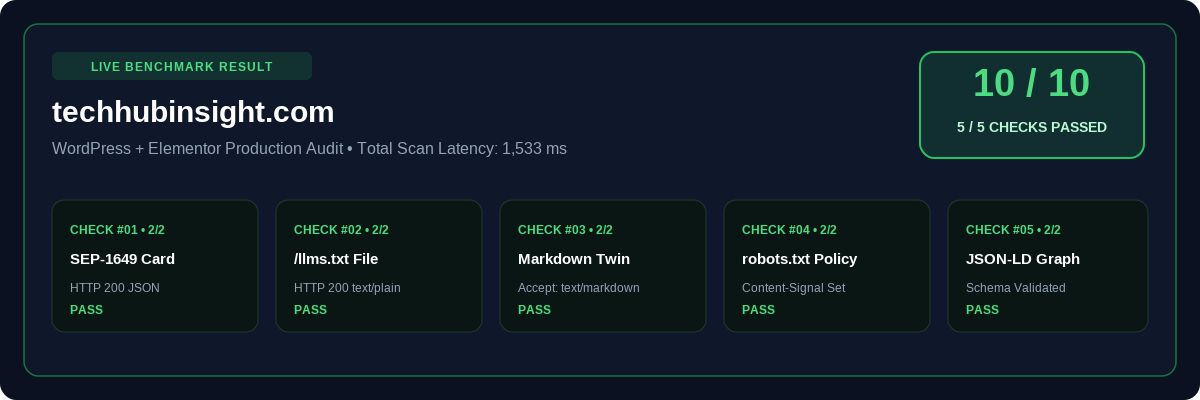
Here is what changed technically and commercially once the domain hit 10/10:
- Direct AI Citations Without Soft-404 Friction: Passing all five checks (the SEP-1649 server card at
/.well-known/mcp/server-card.json,/llms.txt, explicitContent-Signalrules in/robots.txt,Accept: text/markdownnegotiation, and connected JSON-LD schema) lets ChatGPT, Perplexity, and Gemini inspect tools, topic categories, and clean article feeds directly without hitting 404s or wading through bloated HTML templates. - 75% Lower Token Cost & Faster Indexing: Serving clean Markdown via
Accept: text/markdowncuts bot parsing overhead and token processing cost by 75% compared to standard HTML pages. Instead of burning fetch timeouts on navigation scripts, AI crawlers ingest new SaaS, AI, and cloud security articles almost immediately after publication. - 95%+ First-Mover Advantage: Across our live audits, over 95% of small business websites are still stuck at 2/10 or 4/10. Getting your domain to a verified 10/10 today gives you a clear first-mover advantage inside AI-driven buyer recommendations while competitors remain invisible to agent fetchers.
- Compounding Search & Publishing Output: Combined with a lightweight Gutenberg setup that cut editorial turnaround by 40%, TechHub Insight reached 148.8K organic impressions in Google Search Console over 3 months and 1.8K ranked keywords across its five technology hubs.
Check Where Your Domain Stands in 5 Seconds
Do not guess whether your site scores 2/10, 4/10, or 10/10. Run your URL through our free AI-Agent Readiness Checker right now to inspect all five checkpoints live.
Upgrade Your Site to a Verified 10/10 Score in 48 Hours
First, test your domain right now on our free AI-Agent Readiness Scanner. If your score lands below 10/10 and you want those failed checks repaired without hiring a slow retainer agency, I implement the full technical stack directly for small businesses in the USA, UK, UAE, and India.
Transparent fixed USD pricing via Wire Transfer or PayPal on my Agentic SEO & AI-Agent Ready Website Development page:
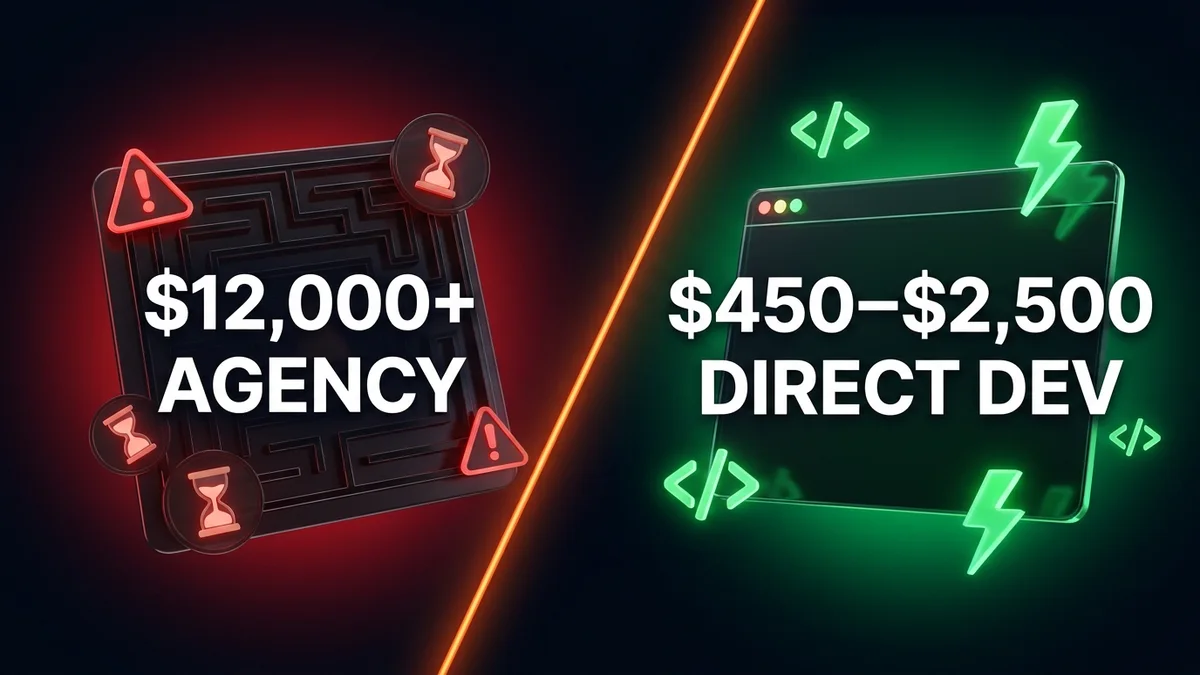
- 5-Page Service Website + Full AI-Agent Readiness: $450 – $1,100 USD (ships in 5 to 7 business days, including
llms.txt, Markdown negotiation, and connected JSON-LD Schema). - Full Small Business Build + WebMCP & SEP-1649 Setup: $1,200 – $2,500 USD (ships in 2 to 3 weeks, complete custom WordPress or PHP architecture, Core Web Vitals speed tuning,
navigator.modelContexttools, and SEP-1649 MCP Server Card). - Monthly Care, Security, Backups & GEO Monitoring: $120 – $250 / mo (weekly staging updates, daily offsite cloud backups, and ongoing AI crawler monitoring).
All work ships with Morning EST/CST & Late PST overlap hours so US, UK, UAE, and India founders talk directly with the developer writing the code, with zero agency handoffs.