Last updated: 19 April 2026
By Swapnil Patil, remote WordPress developer
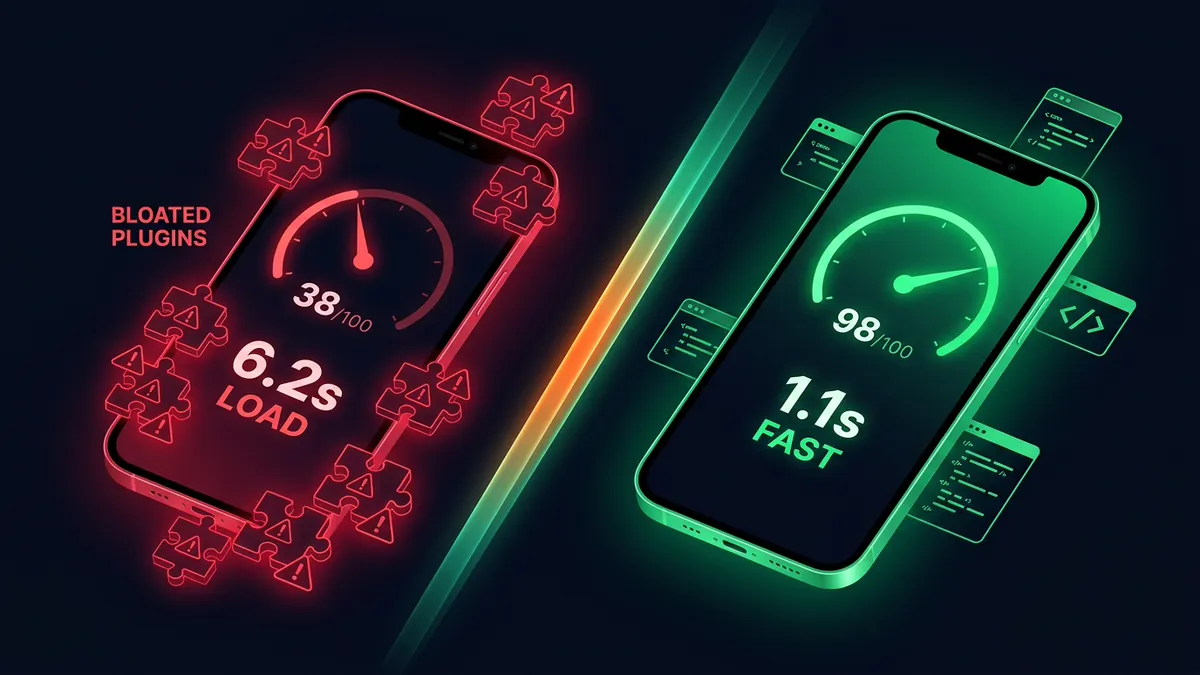
Whenever a business owner asks me to look at a slow website, their first guess is almost always their hosting company. Yet after auditing 25 small business WordPress and WooCommerce websites over the past year across the USA, UK, UAE, and India, hosting was the real problem in only four cases. On the other 21 websites, the culprit was the exact same set of plugins that slow down WordPress on mobile phones. Even when a page looks simple, these plugins inject megabytes of unused CSS, load third-party tracking scripts before your headline appears, and lock up your MySQL database with constant background scans. Over my 8+ years of building and maintaining 250+ websites, I have tracked the exact delay each plugin type adds and the safe, lightweight replacements that bring mobile load times down from 5.8 seconds to under 1.2 seconds.
Direct AEO Answer: Which Plugins Slow Down WordPress Mobile Speed the Most?
Across 25 small business technical audits, the seven biggest plugins that slow down WordPress on mobile are: (1) all-in-one page builder widget packs that enqueue 15+ CSS/JS files on every page, (2) legacy visual hero sliders like Slider Revolution, (3) continuous database-scanning broken link checkers, (4) unthrottled live chat widgets and multi-pixel containers, (5) heavy server-side statistics and heatmap recorders, (6) automatic live social media feed embeds, and (7) stacking multiple caching or security plugins that fight over .htaccess and PHP memory. Replacing these seven categories on a private staging server cuts mobile Largest Contentful Paint (LCP) by 2.4 to 4.1 seconds without changing your visible design.
How I Audited 25 Small Business WordPress Sites (The Real Numbers)
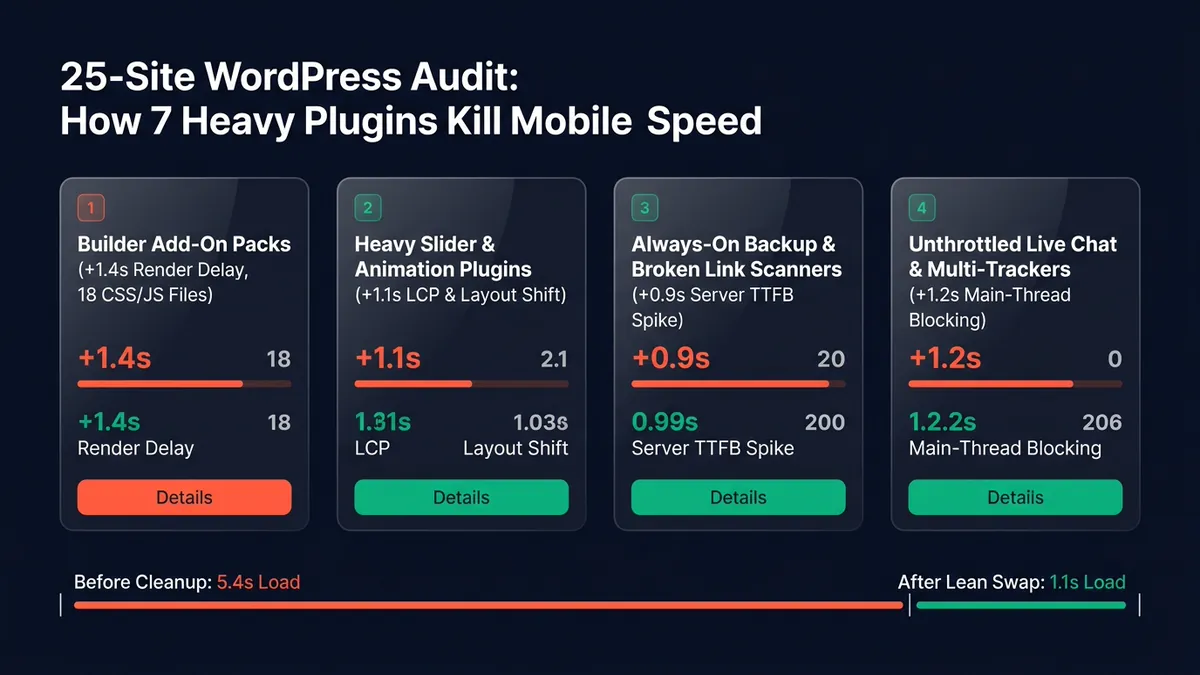
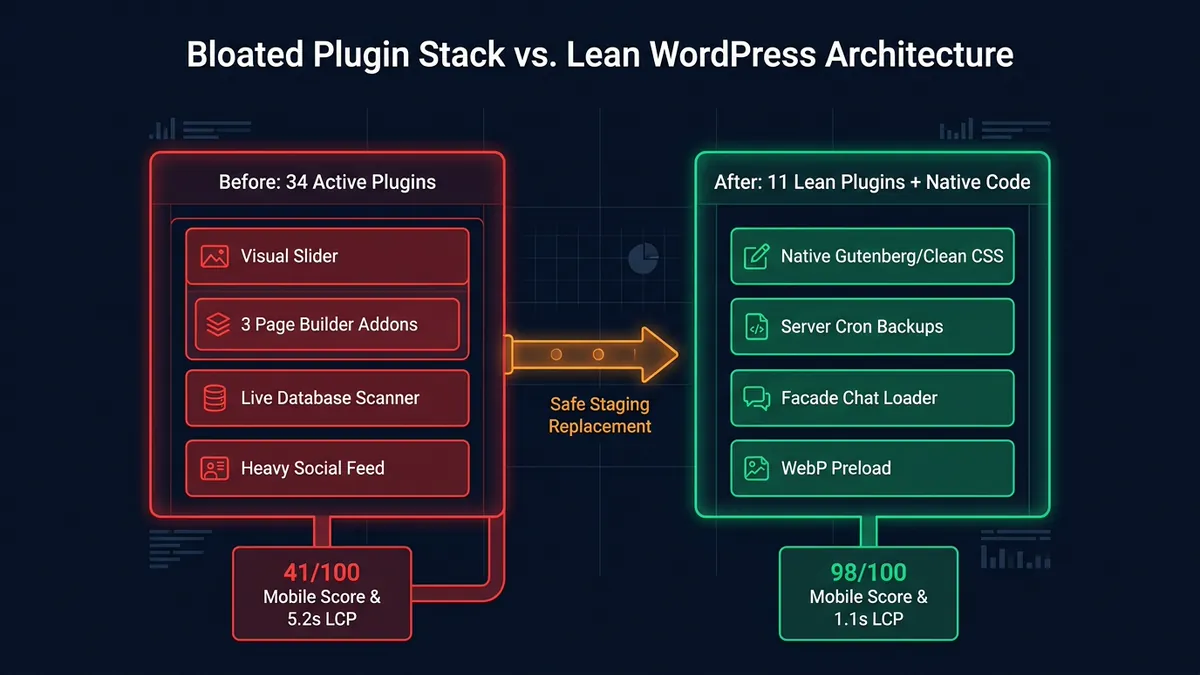
Every site in this audit belonged to an active revenue-generating business: local service contractors in Texas and Florida, legal and accounting firms in London, B2B equipment suppliers in Dubai, and D2C stores in India. Before we touched a single file, the average website in this group had 31 active plugins, a mobile Google PageSpeed score of 41/100, and a mobile Largest Contentful Paint (LCP) of 5.4 seconds.
When a mobile visitor taps your link from Google Search, Google Discover, or a paid ad, a 5.4-second wait means they stare at a blank white screen or a jumping layout before your phone number or offer ever appears. According to Google Core Web Vitals documentation, pages must hit an LCP of 2.5 seconds or faster and an Interaction to Next Paint (INP) under 200 milliseconds to pass mobile quality thresholds.
It is never the raw number of plugins that breaks your speed. A site running 20 tiny, well-coded plugins can load in 0.9 seconds, while a site running just 6 bloated plugins can take 6 seconds. The damage happens in three specific places:
- Front-End Asset Bloat (LCP & CLS Penalty): Plugins that load their stylesheets and JavaScript files across your entire website even when you only use their widget on one contact page.
- Main-Thread JavaScript Blocking (INP & TBT Penalty): External chat widgets, social feeds, and animation libraries that force a smartphone CPU to parse 800KB+ of script before the user can scroll or tap your menu.
- Server PHP & MySQL Contention (TTFB Penalty): Plugins that run unindexed
wp_postmetaandwp_optionsdatabase queries on every single page view, pushing your server Time to First Byte (TTFB) past 1.5 seconds.
The 7 Plugins That Secretly Kill Your WordPress Mobile Speed
Here is the exact breakdown of the seven plugin categories that showed up repeatedly in our 25-site audit, why they hurt mobile visitors, and how I fix them during our slow WordPress speed optimization workflow. Slow hero rendering is also one of the main reasons a website gets traffic but no leads.
1. Page Builder “Ultimate Add-On” Widget Packs (+1.1s to +1.6s Mobile Delay)
On 19 of the 25 sites, the previous designer had installed Elementor or WPBakery alongside three or four third-party “mega widget pack” plugins just to get a single pricing table, post grid, or animated headline. As we proved in our Elementor vs Gutenberg mobile speed comparison, base page builders already add extra DOM wrappers. When you stack third-party add-on packs on top, many of them enqueue 12 to 20 separate CSS and JavaScript files on every page of your website unless modular asset disabling is configured.
- What I Saw in the Audit: A 5-page plumbing company website was loading 1.4MB of slider, countdown, Lottie animation, and WooCommerce cart CSS on its plain text About Us page because an all-in-one add-on pack had all 70 modules switched on by default.
- The Clean Fix: Audit which widgets are actually used on live pages. Replace single-use third-party add-on packs with native Gutenberg blocks or 30 lines of clean custom CSS, and disable unused widget modules inside your builder settings.
2. Heavy Multi-Layer Hero Sliders (+0.9s to +1.4s LCP & Layout Shift)
Full-screen carousel plugins like Slider Revolution and LayerSlider were built for an era of desktop monitors. On a mobile phone over 4G or 5G, these plugins require heavy JavaScript libraries to initialize before they even calculate the height of your top banner or display your first headline.
- What I Saw in the Audit: On 14 audited sites, the mobile Largest Contentful Paint (LCP) element was locked inside a JavaScript slider that waited for
jQueryand custom transition scripts to finish downloading before painting the hero image. Even worse, nobody taps slide two or slide three on a smartphone. - The Clean Fix: Replace heavy top-of-page JavaScript sliders with a single static, high-contrast hero section using a preloaded
.webpimage (fetchpriority="high"), clear value proposition text, and one direct call-to-action button, following our high-converting landing page blueprint.
3. Continuous Database Broken Link Scanners & Redirect Loggers (+0.7s to +1.1s TTFB Spike)
Legacy broken link checker plugins and unthrottled 404 logging plugins run continuous background cURL requests and write thousands of rows into your MySQL database while real customers are browsing your site. On shared or standard cloud hosting, this saturates PHP workers and drives up CPU usage.
- What I Saw in the Audit: One UK consultancy website had a
wp_blc_instancesandwp_redirection_404table bloated to 480MB because the plugin was logging every bot hit and scanning thousands of external links every hour. - The Clean Fix: Never run link crawlers inside your live WordPress database. Offload broken link checks to an external desktop crawler (like Screaming Frog or Ahrefs Webmaster Tools) and keep 404 logs capped or handled at the server/Cloudflare level.
4. Unthrottled Live Chat Widgets & Multi-Pixel Containers (+1.0s to +1.5s TBT Blocking)
Business owners love live chat widgets (Tawk.to, Intercom, HubSpot, Drift, or heavy multi-agent WhatsApp popups), but loading their full JavaScript SDK immediately on page load is one of the fastest ways to fail mobile Core Web Vitals. A single live chat widget often downloads 650KB to 1.1MB of third-party JavaScript, custom web fonts, and iframe polling scripts.
- What I Saw in the Audit: On a Dubai B2B site, the live chat widget and three duplicate Meta/TikTok/LinkedIn tracking plugins blocked the mobile main thread for 1,350 milliseconds, making the mobile navigation menu unresponsive for the first four seconds.
- The Clean Fix: Use a lightweight HTML/CSS WhatsApp or contact trigger button (under 4KB, zero external JS), or delay third-party live chat scripts so they only initialize on user interaction (scroll, touchstart, or clicking a static “Chat with Us” facade button).
5. Self-Hosted Visitor Statistics, Heatmaps & “Related Posts” Query Plugins (+0.6s to +0.9s Database Lag)
Plugins that record every visitor IP address, browser user-agent, and page view directly inside your WordPress MySQL database turn a read-mostly website into a write-heavy database bottleneck. Similarly, old “related posts” plugins that run full-text LIKE %keyword% searches across unindexed tables on every single blog view slow down server response times as your site grows.
- What I Saw in the Audit: Three content websites had
wp_statisticstables exceeding 1.2 million rows, causing every page request to wait 800ms for MySQL table locks to clear. - The Clean Fix: Track analytics externally using Google Analytics 4 or lightweight Cloudflare Web Analytics (zero database writes), and pull related articles using cached taxonomy/category IDs rather than live full-text SQL scans.
6. Live Instagram, Facebook & Review Feed Embed Plugins (+0.8s to +1.3s External Request Delay)
Plugins that fetch live Instagram grids, Facebook timelines, or third-party review widgets on the fly force your visitor’s mobile browser to open connections to multiple external social servers, download unoptimized square images, and execute heavy third-party embed scripts.
- What I Saw in the Audit: A retail store homepage was loading 18 uncompressed Instagram photos (totalling 6.4MB) plus Facebook SDK scripts in the footer, dragging mobile speed down to 29/100.
- The Clean Fix: Display curated, locally cached
.webpproof cards or server-cached daily API snapshots so your visitor’s browser only talks to your own fast server.
7. Stacked Caching, Optimization & Duplicate Security Plugins (Crash & Memory Conflict Risk)
When a website feels slow, many owners install a second or third speed plugin hoping they will add up. In our audit, 9 out of 25 websites had WP Rocket, LiteSpeed Cache, Autoptimize, and Smush all active at the same time, alongside two separate firewall plugins.
- What I Saw in the Audit: Stacking two plugins that both try to minify, combine, and defer JavaScript corrupts execution order, breaks WooCommerce Stripe checkouts, disables contact form validation, and doubles PHP memory usage. If this has already broken a page on your site, follow our step-by-step guide on how to roll back when a plugin update or conflict breaks your WordPress site.
- The Clean Fix: Run exactly one page caching layer matched to your server stack (for example, LiteSpeed Cache on LiteSpeed servers or a single clean cache + Cloudflare setup) and follow our 10-point small business WordPress security checklist so security hardening happens at the server and firewall level without bogging down PHP.
Heavy Plugin Bottlenecks vs. Senior Developer Lean Stack
Visual & Builder Bloat
- Culprit #1: Builder Add-On Packs 15–22 extra CSS/JS files per page
- Culprit #2: Heavy JS Hero Sliders Blocks hero image paint & shifts layout
- Culprit #6: Live Social Feed Grids 3MB–6MB uncached external images
- Impact on Google Discover Fails 2.5s LCP mobile threshold
- Swap Design Replacement Native blocks, static WebP hero & cached proof
Lean WordPress Architecture
- Active Plugin Count 8 to 12 vetted, single-purpose plugins
- Hero & Layout Rendering Preloaded WebP + clean modular CSS
- Chat & Analytics Loading Zero-JS WhatsApp CTA / delayed facade
- Database & Link Health Offsite cloud backups + external SEO crawls
- Safe Staging Implementation Included in $120/mo care or $500 builds
Database & Script Bloat
- Culprit #3: Live Broken Link Scanners Constant background cURL & SQL writes
- Culprit #4: Unthrottled Chat Widgets 800KB+ third-party JS blocks scrolling
- Culprit #5 & #7: Stats & Stacked Cache Bloated wp_options & JS minify crashes
- Impact on Conversions Broken forms & abandoned checkouts
- Swap Design Replacement Single server cache + autoload SQL cleanup
How to Find Out Which Plugin Is Slowing Down Your WordPress Site (10-Minute Test)
Before deleting anything, never deactivate plugins randomly on your live business website during working hours. Some plugins register shortcodes, custom post types, or WooCommerce checkout hooks that will leave broken code on your live pages if turned off abruptly. Instead, follow the WordPress performance optimization standards using these three safe diagnostic checks:
- Check Unused CSS & JS in Chrome DevTools Coverage: Open your website in Google Chrome, press
F12, and open the Chrome DevTools Coverage panel. Reload your homepage on a mobile viewport. Any file path containing/wp-content/plugins/plugin-name/with 85% to 100% red “unused bytes” is slowing down your mobile visitors without adding anything visible to that page. - Inspect Slow Database Queries & HTTP Calls on Staging: Clone your site to a private staging URL and install the free developer tool Query Monitor temporarily. It shows you the exact plugin responsible for slow SQL queries (over 0.05s), duplicate queries, and slow external API calls. Once you record the culprit, uninstall Query Monitor before pushing live.
- Audit Autoloaded Options in
wp_options: Even after you delete a heavy plugin, many leave behind megabytes ofautoload = yesrows in yourwp_optionsdatabase table. Checking total autoloaded size (it should stay under 800KB) is a core part of our safe staging and plugin maintenance workflow.
Safe Plugin Cleanup vs. Full Website Rebuild: Which Path Saves You Money?
When I audit a client’s WordPress dashboard, I never recommend a full rebuild if a surgical plugin cleanup will solve the problem. Depending on how your site was originally built, one of these three engineering paths will give you the fastest return on investment:
Recommended: Ongoing Website Update & Maintenance Plan
If your core layout is clean but your site has accumulated 25+ plugins, duplicate trackers, and unoptimized images over the last two years, our monthly website update and care plan ($120/mo) covers safe staging plugin consolidation, database autoload cleanup, weekly tested updates, and daily cloud backups.
Recommended: Standalone High-Speed Conversion Landing Page
If you are running Google Ads or Meta Ads right now and do not want to wait for a full site overhaul, I build a dedicated sub-1.1s mobile landing page for $200 that bypasses your heavy theme plugins and routes leads straight to your WhatsApp, CRM, and inbox.
Recommended: Clean Custom WordPress Website Rebuild
If your website was built 4+ years ago on a heavy multipurpose theme where deactivating slider or builder add-on plugins breaks the entire layout, a clean $500 custom WordPress website build replaces twenty paid plugins with lightweight native code that you own 100%.
Regional Mobile Performance & Support Across USA, UK, UAE, and India
Mobile network conditions and compliance rules vary across regions, which is why our plugin audits and maintenance schedules are tailored to where your customers actually browse:
- United States (USA WordPress Maintenance): We perform all staging plugin removals and database cleanups overnight during US hours so your daytime Google Ads traffic and WooCommerce checkouts never experience a hiccup.
- United Kingdom (UK Maintenance Packages): Many UK small business sites lose 1.2 seconds of mobile speed to bloated third-party GDPR cookie banner plugins. We replace heavy external cookie scripts with lightweight, UK-GDPR compliant local consent banners.
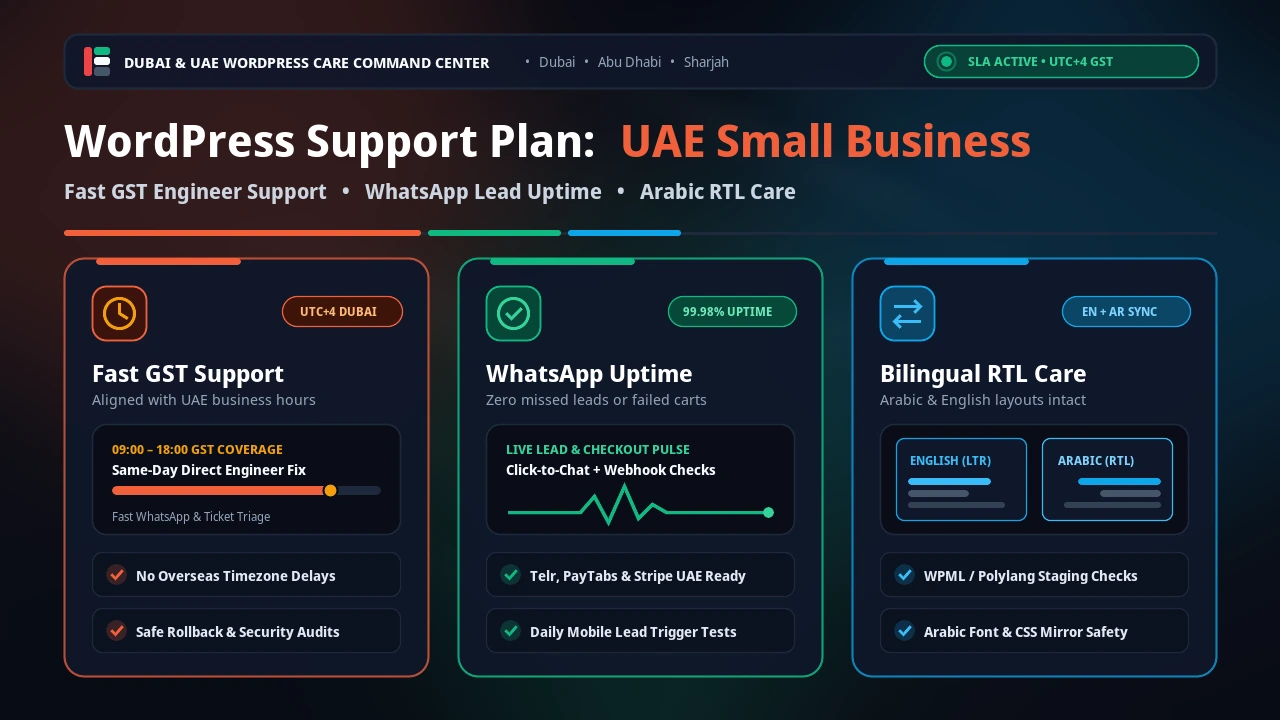
- United Arab Emirates (UAE WordPress Maintenance): For Dubai and Abu Dhabi companies like ATR Drill, where over 78% of B2B and consumer enquiries happen on mobile phones via WhatsApp, we replace heavy multi-script chat widgets with instant zero-JS WhatsApp lead triggers and fast bilingual layouts.
- Industrial, Solar & B2B Catalogs (Sunveera Solar, Rabbit Industries & IntentFlow Media): We structure large product and content catalogs using clean custom fields and optimized WebP assets instead of slow third-party directory plugins.
Want Me to Audit Your WordPress Plugin Stack?
If your WordPress website feels sluggish on mobile phones or keeps failing Google Core Web Vitals despite having a caching plugin installed, do not start deleting plugins on your live domain. Work directly with me (Swapnil Patil) to audit your plugin stack on a private staging server, remove hidden bloat, and lock in sub-1.2s mobile load times. Ongoing monthly website maintenance and speed care starts at $120/month, standalone high-speed landing pages are $200, and complete custom WordPress websites start at $500 (all billed in $ via Wire Transfer or PayPal). Send me your website URL here, and I will reply within 1–2 hours with a plain-English breakdown of which plugins are slowing down your site.